Wyrm-DB
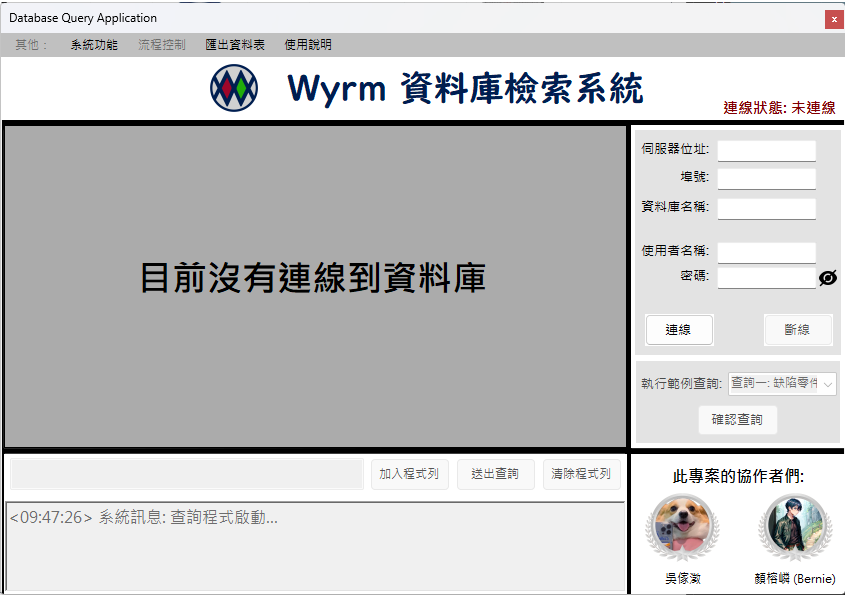
A MariaDB database management tool built with C# Windows Forms, providing an intuitive GUI for executing SQL queries, exporting CSV data, and managing database connections with JSON configuration.

Project Introduction
Wyrm-DB GUI is a Windows Form application specifically designed for MariaDB database querying and management, aiming to provide an intuitive and user-friendly graphical interface for the automobile company database system. This project serves as an extension of the Database Final Project (DB_FinalProject), transforming complex SQL queries into a visual user experience, allowing users to perform database connections, query executions, and result exports without deep knowledge of SQL syntax.
Core Philosophy
- User-Friendly Design: Simplify database operations and lower technical barriers
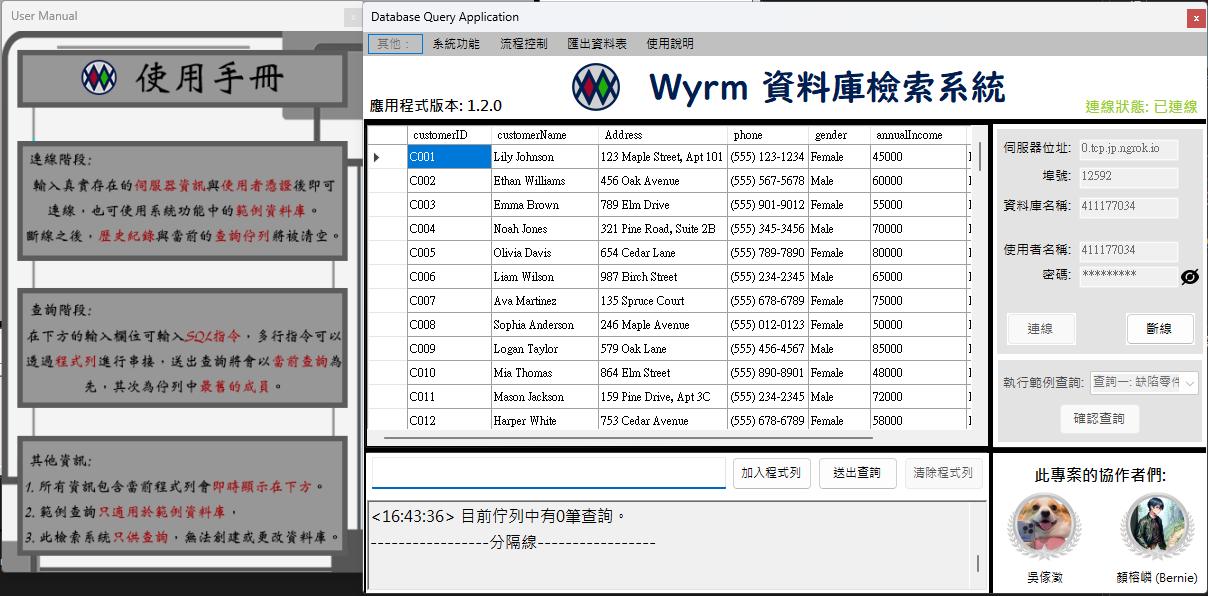
- Visual Data Presentation: Clear display of query results using DataGridView
- Flexible Query Support: Support for custom SQL queries and quick testing with example databases
- Security Considerations: Sensitive data (OAuth credentials, database passwords) managed through external configuration files
My Responsibilities
As one of the main developers of this project, I collaborated with Wu Jia-Cheng (Charlie) to complete the following work:
System Architecture Design
- Designed Windows Forms application architecture with Model-View-Controller separation
- Built MariaDB connection management module handling connection lifecycle and error handling
- Designed external configuration file mechanism (JSON) to separate sensitive data from code
Core Feature Implementation
- Database Connection Management: Implemented IP, Port, Database, Username, Password validation and connection establishment
- SQL Query Execution Engine: Support for single queries and batch queries (command queue), handling query results and error messages
- Example Database System: Load default connection information and sample queries from
UserConfigs/exampleDbConfig.json - Result Export Function: Export DataGridView data to CSV format
- UI/UX Design: Implemented button fade-in/fade-out animations, status indicators, user manual window
Testing & Maintenance
- Tested integration with DB_FinalProject database (automobile company database schema)
- Handled common MariaDB errors (NU1301, 401/403 authentication errors)
- Optimized query performance and UI responsiveness
Core Features
1. Database Connection Management
- Connection Parameter Validation: Check server IP format, port range, required fields
- Connection Status Indicator: Visual display of connection success/failure status
- Dynamic Table Loading: Automatically list all tables in the database upon successful connection
2. SQL Query Execution
- Interactive Query Interface:
Enterkey: Submit single queryShift + Enter: Add query to command queueAlt + Enter: Clear command queue and saved queries
- Batch Query Support: Command queue mechanism allows sequential execution of multiple SQL statements
- Result Visualization: DataGridView displays query results in real-time
- Error Catching: Capture and display SQL syntax errors and execution error messages
3. Example Database Integration
External Configuration File Loading: Read default connection information from
UserConfigs/exampleDbConfig.json{ "Server": "your_server_ip", "Port": "your_port", "Database": "your_database", "User": "your_username", "Password": "your_password" }Example Query Preloading: Support for predefined common query statements for quick testing
Security Design: Configuration files excluded from version control to protect sensitive information
4. Data Export Function
- CSV Format Export: Export query results to comma-separated values files
- Custom Save Path: Users can choose file name and save location
- Field Header Retention: Include table field names when exporting
5. User Experience Optimization
- Animation Effects: Button fade-in/fade-out effects enhance interaction experience
- User Manual: Built-in help window (modal/non-modal selectable)
- Shortcut Key Support: Common operations provided with keyboard shortcuts
- Status Feedback: Real-time display of connection status and query progress
Technologies Used
Core Frameworks
- Windows Forms: .NET Framework 4.7.2 desktop application framework
- C#: Primary development language
- Visual Studio: Integrated development environment
Database Connectivity
- MySql.Data (8.4.0): MariaDB/MySQL .NET Connector
- ADO.NET: Database operation abstraction layer
- System.Data: DataTable, DataGridView data processing
Data Processing & Serialization
- Newtonsoft.Json (13.0.3): JSON configuration file parsing
- System.Text.RegularExpressions: IP address and input validation
UI Components
- DataGridView: Query result presentation
- TextBox: SQL query input
- ToolStrip/MenuStrip: Menu bar and toolbar
- SaveFileDialog: CSV export file selection
Dependencies
- BouncyCastle.Cryptography (2.4.0): Encryption support
- Google.Protobuf (3.27.1): Serialization support
- K4os.Compression.LZ4 (1.3.8): Data compression
Project Status
Current Version: v1.2.0 (Released)
- Core Functionality Status: All main features completed and running stably
- Integration Testing: Fully integrated and tested with DB_FinalProject database
Feature Completion
- ✅ Completed:
- Database connection and validation mechanism
- SQL query execution and result display
- Example database configuration system
- CSV export function
- User manual and documentation
- UI/UX animation and interaction design
- 🔄 Planned (To-Do List):
- Add multi-language support (currently Chinese interface only)
- Support different database schemas (currently optimized for automobile company database)
- Support more complex SQL queries (e.g., JOIN, subquery visualization)
- Add more database operations (GUI support for CREATE, UPDATE, DELETE)
Development Challenges & Learnings
1. MariaDB Connection Stability Management
Challenge: How to handle abnormal situations like network interruptions, connection timeouts, and unresponsive database servers?
Solution:
- Implemented comprehensive try-catch error handling mechanism
- Used
MySqlConnection.Stateto check connection status - Provided visual connection status indicators (Connected/Disconnected)
- Offered clear error messages and retry suggestions upon connection failure
Learnings:
- Deep understanding of ADO.NET connection pool management
- Learned database connection lifecycle management
- Mastered exception handling best practices
2. Dynamic Binding of SQL Query Results
Challenge: Different SQL queries return varying numbers and types of fields - how to dynamically display them in DataGridView?
Solution:
- Used
DataTableas intermediate data structure - Utilized
MySqlDataAdapter.Fill()to automatically populate DataTable - DataGridView automatically adjusts field display based on DataTable schema
- Handled NULL values and special character display
Learnings:
- Mastered data binding mechanism between DataTable and DataGridView
- Learned generic data processing techniques
- Understood dynamic handling of database result sets
3. Sensitive Data Security Management
Challenge: How to support example database functionality without committing database passwords to GitHub?
Solution:
- Designed external JSON configuration file mechanism (
exampleDbConfig.json) - Excluded configuration files in
.gitignore - Provided
Example Database Usage.txtdocumentation to guide users in creating configurations - Implemented configuration file existence check, disabling example database button when not configured
Learnings:
- Learned application configuration management best practices
- Understood the importance of sensitive data protection
- Mastered JSON serialization and deserialization techniques
4. Batch Query Command Queue Design
Challenge: How to allow users to execute multiple SQL queries sequentially and manage query history?
Solution:
- Implemented
Queue<string>to store query queue - Used
Stack<string>to manage query history - Provided shortcut key combinations (Enter, Shift+Enter, Alt+Enter) for different operations
- Visualized current command queue status
Learnings:
- Mastered practical application of data structures (Queue, Stack)
- Learned user operation flow design
- Understood keyboard event handling and shortcut implementation
5. Collaborative Development & Code Integration
Challenge: How to ensure consistent code style and avoid feature conflicts when developing with collaborators?
Solution:
- Used Git for version control and branch management
- Conducted regular code reviews and integration testing
- Established clear development documentation and comments
- Tracked tasks and bugs through GitHub Issues
Learnings:
- Enhanced team collaboration skills
- Learned code review and refactoring techniques
- Understood software development lifecycle management
Application Snapshots