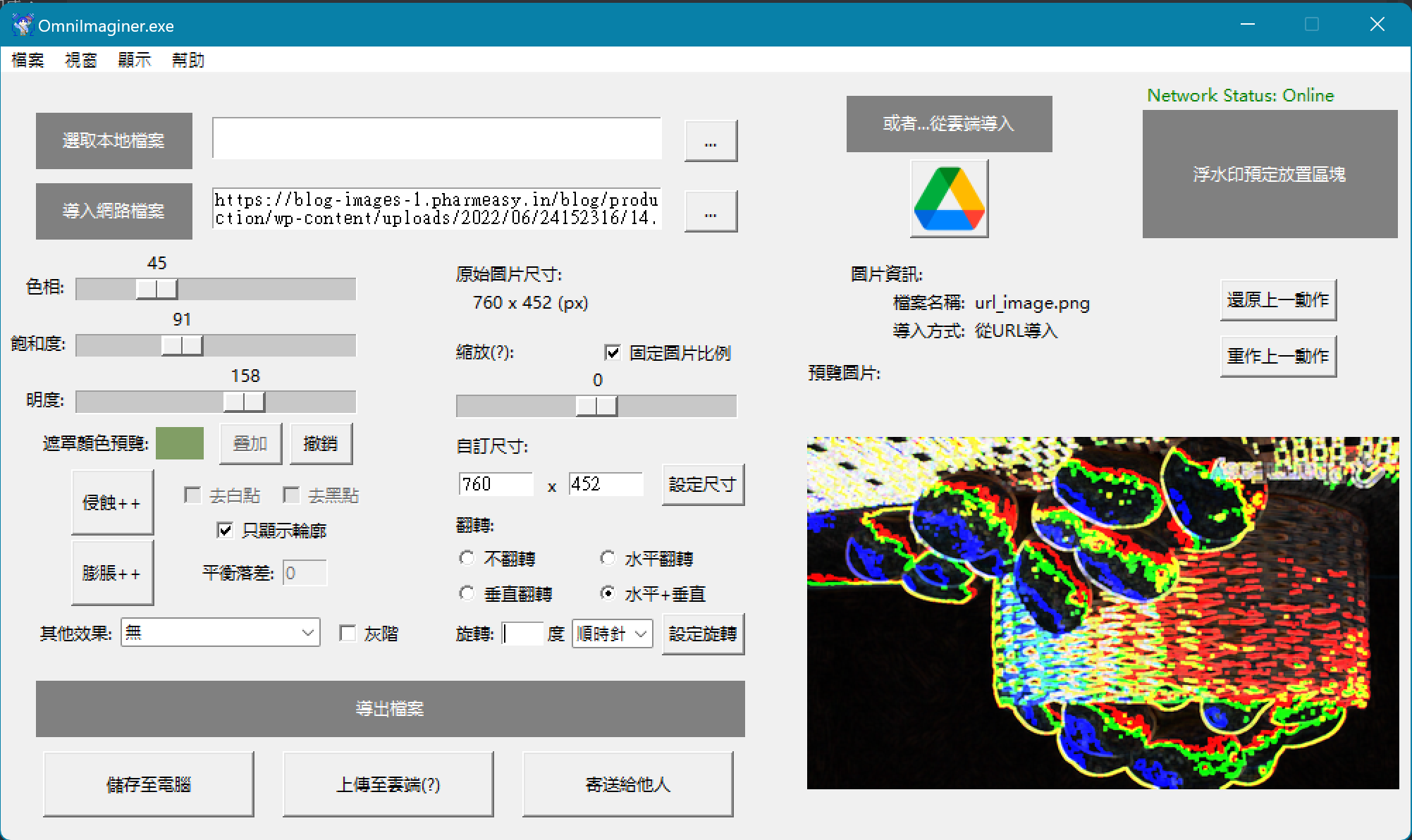
Omniimagainer - Multi-Purpose Image Processing Application
A Python Tkinter desktop application integrating image format conversion, effect processing (blur, sharpen, edge detection), cloud storage, and email sending, featuring Google Drive OAuth 2.0 authentication upload and real-time preview.
Project Introduction
Omniimagainer is a multi-functional image processing desktop application that integrates image format conversion, effect processing, cloud storage, and email delivery features. The project adopts a modular design, providing an intuitive graphical interface through Tkinter, supporting local storage, Google Drive cloud upload, and email attachment sending, suitable for quick image editing and sharing scenarios. The system uses OpenCV and Pillow for image processing and integrates Google Drive API to implement cloud synchronization functionality.
Core Philosophy
- One-Stop Image Processing: Editing, storage, and sharing integrated into a single application
- Cloud Integration: Support for Google Drive OAuth 2.0 authentication and file upload
- Modular Architecture: Functions separated into independent processor classes for easy maintenance and expansion
- User-Friendly: Tkinter GUI provides real-time preview and hover tooltips
My Responsibilities
As the core developer of the project (collaborating with timli6307, samtto22-MewCat, wakaba0972), I am responsible for:
System Architecture Design
- Designed five-module architecture: UserInterface, FileManager, EffectProcessor, PositionProcessor, StepRecord
- Established Main.py entry point with automatic dependency checking mechanism
- Implemented image processing workflow: Import → Edit → Preview → Export
Core Feature Implementation
- Graphical User Interface (UserInterface.py): 744 lines of Tkinter code implementing main window, preview panel, hover tooltips, network connectivity check
- File Management System (FileManager.py): 337 lines of code integrating Google Drive API, OAuth 2.0, SMTP email sending, local file dialogs
- Effect Processor (EffectProcessor.py): 83 lines of code implementing HSV color adjustment, erosion filter, 6 filter effects
- Position Processor (PositionProcessor.py): 23 lines of code handling image scaling and adjustment
- Step Record System (StepRecord.py): 53 lines of code implementing Undo/Redo functionality and operation history management
Cloud Integration & Authentication
- Google Drive API OAuth 2.0 flow implementation (credentials.json + token.json)
- SMTP email sending integration (Gmail SMTP SSL)
- Real-time network connectivity status checking
Core Features
1. Image Editing Functions
- Effect Processor (EffectProcessor)
- HSV color space adjustment (Hue, Saturation, Value)
- Erosion filter: Morphological operations using 5x5 kernel
- 6 stackable filter effects
- Real-time preview and color picker
- Position Processor (PositionProcessor)
- Image scaling and cropping
- Aspect ratio adjustment
- Size optimization (improvement planned)
2. File Management System
- Local Storage (FileManager.saveFileLocal)
- Use filedialog to select save location
- Support multiple formats: PNG, JPEG, BMP
- Automatic path resolution and format conversion
- Cloud Storage (FileManager.saveFileCloud)
- Google Drive API v3 integration
- OAuth 2.0 authentication flow
- InstalledAppFlow handling authorization window
- MediaFileUpload for preview image upload
- Email Sending (FileManager.sendFileViaMail)
- SMTP SSL connection (Gmail port 465)
- MIMEMultipart email assembly: subject + content + image attachment
- Regular expression email format validation
- Custom send window (500x500 Toplevel)
3. Step Recording & Restoration
- Undo/Redo System (StepRecord)
- Record each editing operation (parameters, filters, flips)
- Support multi-step backward and redo
- Reset all actions functionality
4. User Interface
- Main Window (UserInterface.ui)
- Tkinter main window and preview panel
- Microsoft YaHei font display
- Hover tooltip system (idlelib.tooltip)
- Network status indicator
- Multi-language support planned (lang_zh.txt)
- Preview System
- Real-time display of editing results (Preview.png)
- PIL ImageTk integration
- Dynamic canvas updates
Technologies Used
Image Processing Libraries
- OpenCV (4.5.4.60): Main image processing engine
- cv2.imread/imwrite: Image read/write
- cv2.cvtColor: Color space conversion (BGR ↔ HSV)
- cv2.erode: Morphological erosion operations
- Pillow (8.4.0): Format conversion and Tkinter integration
- Image.open/save: Multi-format support
- ImageTk.PhotoImage: Tkinter display
- NumPy (1.21.5): Array operations and numerical computation
Cloud & Network Integration
- Google API Client (2.64.0): Google Drive integration
- google-auth-oauthlib (0.5.3): OAuth 2.0 authentication
- googleapiclient.http: MediaFileUpload
- SMTP (standard library): Gmail email sending
- smtplib.SMTP_SSL: SSL encrypted connection
- email.mime: Multipart email assembly
- Requests (2.28.1): Network connectivity checking
User Interface
- Tkinter (standard library): GUI framework
- ttk: Modern widgets
- filedialog: File selection dialogs
- messagebox: Popup windows (showinfo, showerror, askyesno)
- idlelib.tooltip: Hover tooltip functionality
Development Tools
- Visual Studio: Project management (.pyproj, .sln)
- Git: Version control (3 collaborators)
- pip: Automatic dependency checking and installation
Project Status
Current Version: Feature Complete (Continuous Optimization)
- Core Feature Status: Image editing, cloud upload, email sending all implemented
Feature Completion
- ✅ Completed:
- OpenCV/Pillow image processing
- Google Drive OAuth 2.0 authentication
- SMTP email sending system
- Tkinter graphical interface
- Network connectivity status checking
- Undo/Redo step recording
- 🔄 In Progress:
- Handling accidental OAuth window closure
- Image resize optimization
- 📋 Planned:
- Multi-language support (Language selection)
- Reset handling when closing top-level windows
- More comprehensive step recording system
Development Challenges & Learnings
1. Google Drive OAuth 2.0 Integration
Challenge: How to securely handle Google API authentication flow?
Solution:
- Used InstalledAppFlow to start local OAuth server
- credentials.json stores Client ID/Secret
- token.json caches access tokens to avoid repeated authentication
- SCOPES limit permissions: only request file read/write permissions
To be Improved:
- Handle accidental OAuth window closure
- Implement automatic token refresh on expiration
Learnings:
- Deep understanding of OAuth 2.0 authorization flow
- Learning Google API best practices
- Mastering sensitive data management techniques
2. SMTP Email Sending System
Challenge: How to assemble multipart emails with image attachments?
Solution:
- Used MIMEMultipart container to integrate multiple content types
- MIMEText handles text content (subject, body)
- MIMEImage handles image attachments (Preview.png)
- Regular expression strictly validates email format
Learnings:
- Understanding MIME multipart email structure
- Learning SMTP authentication and SSL encryption
- Mastering email protocol standards
3. Complex Tkinter UI Design
Challenge: UserInterface.py reaches 744 lines, how to maintain code readability?
Solution:
- Split functions into independent methods (quit, sendM, saveL, saveC, etc.)
- Used Toplevel windows to isolate complex processes (email sending)
- StringVar/textvariable for data binding
- Hovertip provides interactive explanations
Learnings:
- Mastered Tkinter layout management (pack, place)
- Learning GUI event-driven programming
- Understanding user experience design principles
4. Modular Architecture Design
Challenge: How to cleanly separate functions into independent modules?
Solution:
- Classes/ folder contains 5 specialized processors
- Each class has single responsibility:
- FileManager: File I/O and cloud integration
- EffectProcessor: Image effects
- PositionProcessor: Image transformation
- StepRecord: History tracking
- UserInterface: UI logic
Learnings:
- Understanding modular design principles
- Learning Separation of Concerns
- Improving code maintainability
5. Network Connectivity Status Checking
Challenge: How to gracefully handle offline status?
Solution:
- chknet() method attempts to connect to google.com (10-second timeout)
- Catches ConnectionError and Timeout exceptions
- Checks network status before executing cloud features
- Displays friendly error messages
Learnings:
- Learning exception handling best practices
- Understanding network request timeout mechanisms
- Improving application robustness
Future Plans
Short-Term Goals
- Fix OAuth window accidental closure handling
- Optimize image resize algorithm
- Handle reset logic when closing top-level windows
Mid-Term Goals
- Implement multi-language support system (Chinese/English switching)
- Enhance step recording functionality (display operation history)
- Add more image filters (blur, sharpen, edge detection)
Long-Term Goals
- Support batch processing of multiple images
- Integrate more cloud services (Dropbox, OneDrive)
- Develop plugin system supporting custom filters
- Add AI image enhancement features
Project Highlights
Technical Innovation
- ✅ Integrated Google Drive API and OAuth 2.0 for secure cloud upload
- ✅ Modular architecture with 5 independent processor classes and clear separation of concerns
- ✅ Complete SMTP email sending system supporting multipart MIME emails
- ✅ Real-time preview and network status checking, enhancing user experience
Collaborative Development
- ✅ Collaboration with 3 contributors (timli6307, samtto22-MewCat, wakaba0972)
- ✅ Git version control management
- ✅ Clear code structure facilitating multi-developer collaboration
Practical Value
- ✅ One-stop image processing solution (edit + save + share)
- ✅ Support multiple export methods (local, cloud, email)
- ✅ Lightweight desktop application requiring no professional image software installation
Learning Outcomes
- ✅ Deep implementation of cloud API integration (Google Drive)
- ✅ Mastered image processing technologies (OpenCV, Pillow)
- ✅ Understanding GUI programming (Tkinter)
- ✅ Learning email protocols and network programming
Application Snapshot